> For the complete documentation index, see [llms.txt](https://docs.stackerhq.com/stacker-astra/llms.txt). Markdown versions of documentation pages are available by appending `.md` to page URLs; this page is available as [Markdown](https://docs.stackerhq.com/stacker-astra/builder-agent-mode/share-with-your-users.md).
# Share with your users
Add users to your app by clicking add users on the top or going to app settings > add users. Choose a role for the user.
Once you have added users you can share the app with them by giving them the URL to your app. This can be found in the search bar at the top or by going to app settings > URL.
### Table groups
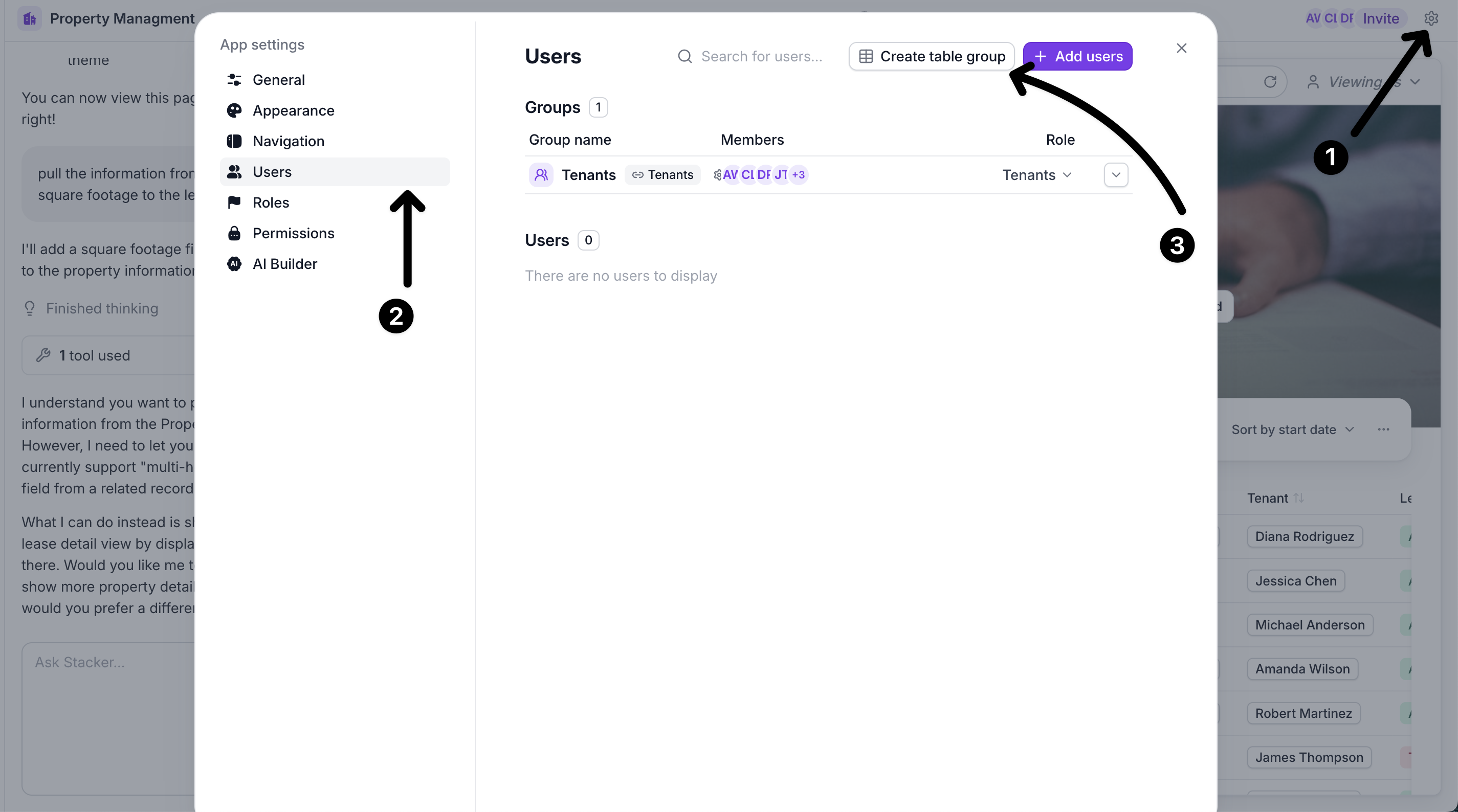
Add multiple users at one time by using a table from your existing data.
Click on the **App settings** icon on the top right, select the **Users** tab and select **Create table group.**
Then you will be prompted to give your group a name, select a role and the field the email address is in. Each user needs to have their own unique email address in order to sign in.
### Share your app
For your users to sign in, you will need to give the the URL of your app, this can be found in the General section of the App settings.
{% hint style="info" %}
Portals will have a URL that looks like this:
{% endhint %}
{% hint style="warning" %}
Make sure you set up [permissions](https://docs.stackerhq.com/stacker/~/revisions/ERmTStRl6onjH8yItRgh/builder-agent-mode/add-user-permissions), if needed, before sharing the URL with your users or team.
{% endhint %}