> For the complete documentation index, see [llms.txt](https://docs.stackerhq.com/stacker-astra/llms.txt). Markdown versions of documentation pages are available by appending `.md` to page URLs; this page is available as [Markdown](https://docs.stackerhq.com/stacker-astra/security/add-user-permissions/create-or-edit-a-permission-rule.md).
# Create or edit a permission rule
### Create a permission rule
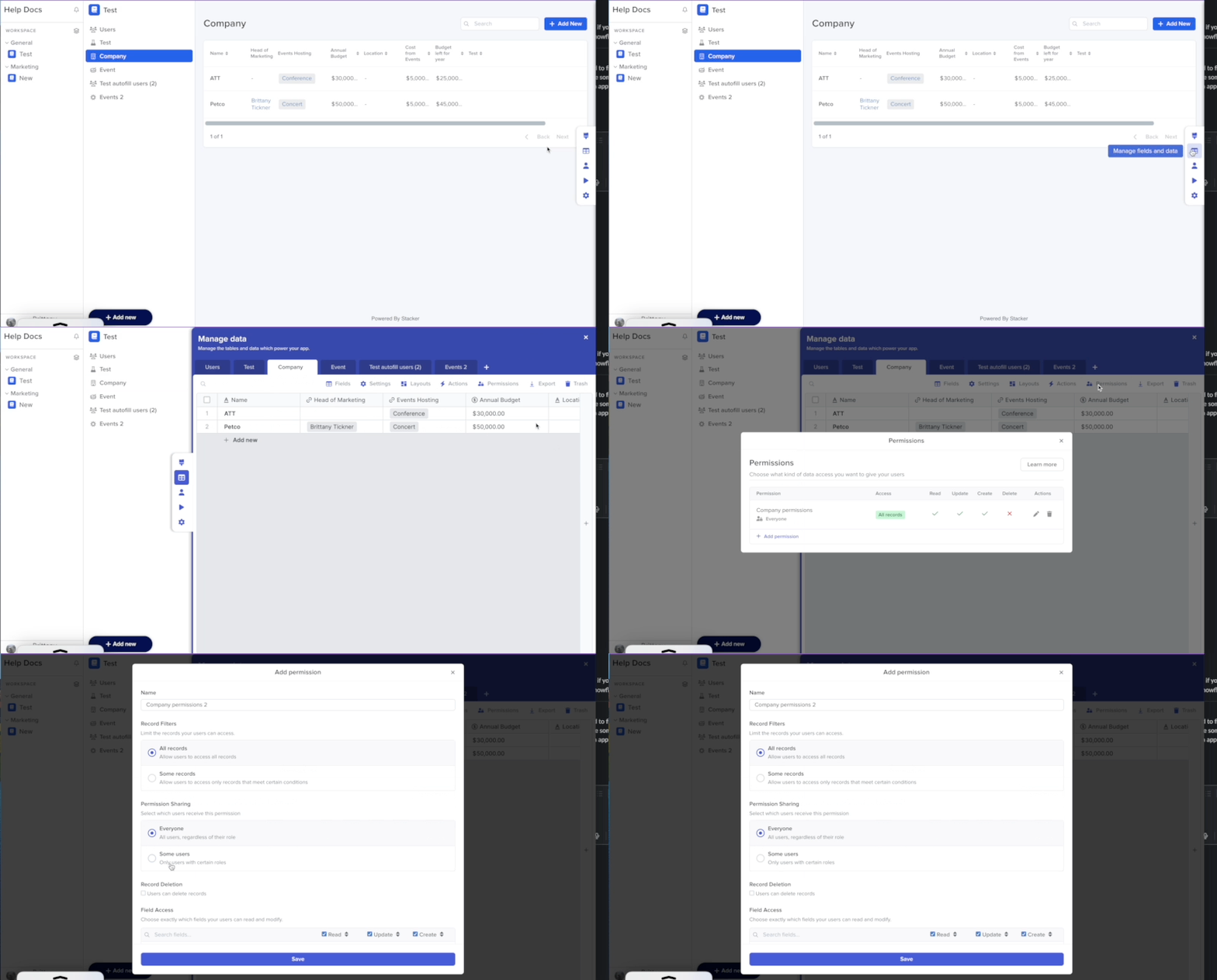
1. Click**Manage fields and data**
2. Select the table you want to add permissions
3. Click **Permissions**
4. Click **+Add Permission** to create a new permission rule
{% hint style="info" %}
Edit the permissions by selecting the Pencil Icon
{% endhint %}
 **Manage fields and data**
2. Select the table you want to add permissions
3. Click **Permissions**
4. Click **+Add Permission** to create a new permission rule
**Manage fields and data**
2. Select the table you want to add permissions
3. Click **Permissions**
4. Click **+Add Permission** to create a new permission rule
 Pencil Icon
{% endhint %}
Pencil Icon
{% endhint %}