# Action buttons in Sections

### Add Action Button to Sections <a href="#h_01fzjk5t7d35j0tafaq6zx0jmp" id="h_01fzjk5t7d35j0tafaq6zx0jmp"></a>

1. Go to your detail layout
2. Click<img src="https://3670244749-files.gitbook.io/~/files/v0/b/gitbook-x-prod.appspot.com/o/spaces%2F6QaGf7ZvNU2Re8mlQTaJ%2Fuploads%2FnwPUNjZ6bEwMwsAacHwR%2FCleanShot%202024-04-02%20at%2009.08.29%402x.png?alt=media&#x26;token=43a6b412-6838-4c61-9337-56245d54b81d" alt="" data-size="line">**Edit Layout**
3. Add a section&#x20;
4. In the<img src="https://3670244749-files.gitbook.io/~/files/v0/b/gitbook-x-prod.appspot.com/o/spaces%2F6QaGf7ZvNU2Re8mlQTaJ%2Fuploads%2FnwPUNjZ6bEwMwsAacHwR%2FCleanShot%202024-04-02%20at%2009.08.29%402x.png?alt=media&#x26;token=43a6b412-6838-4c61-9337-56245d54b81d" alt="" data-size="line">**Edit layout** sidebar, click the **Controls** tab
5. Toggle on the action button
6. Choose Top or Bottom to display the button
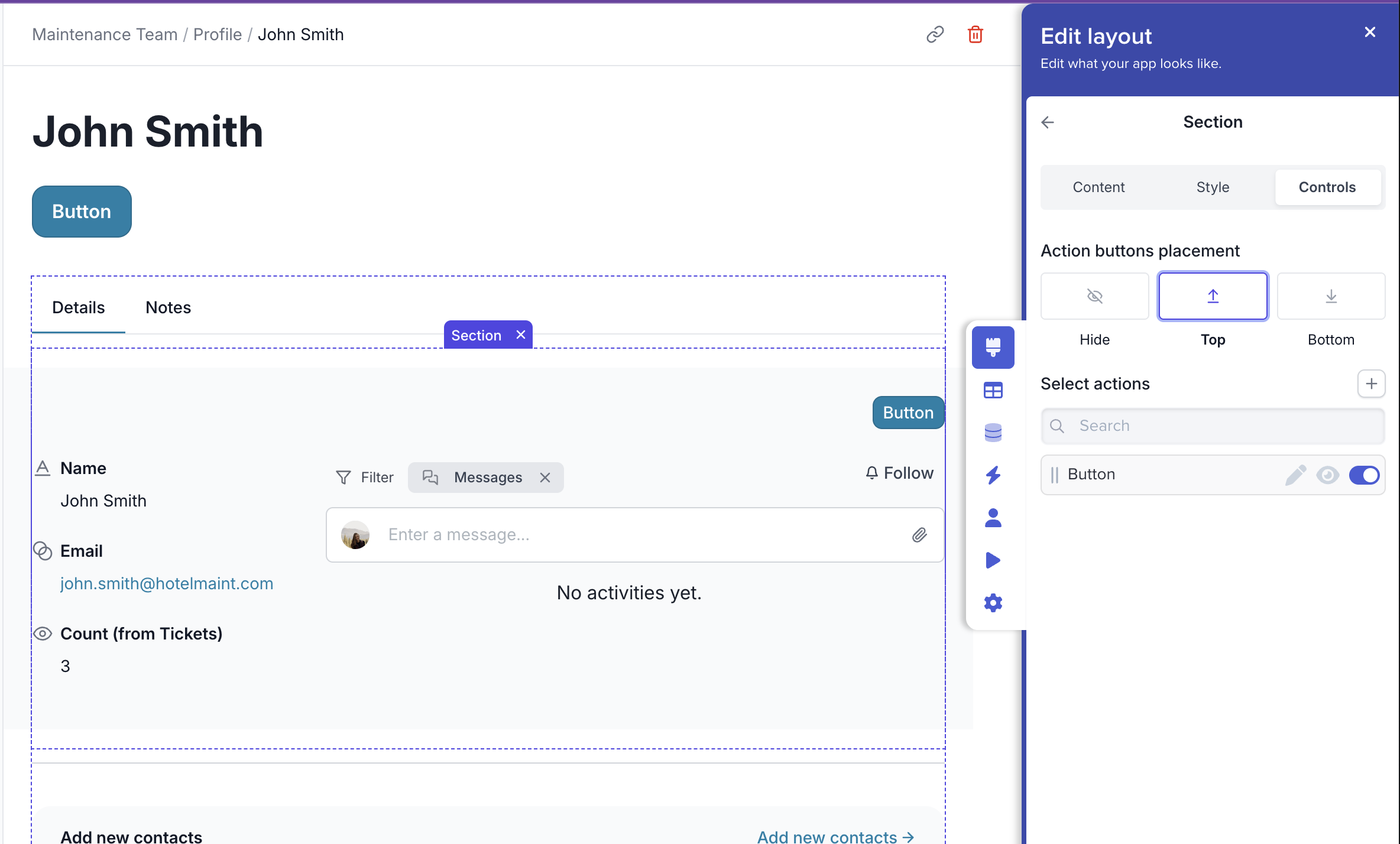
<figure><img src="https://3670244749-files.gitbook.io/~/files/v0/b/gitbook-x-prod.appspot.com/o/spaces%2F6QaGf7ZvNU2Re8mlQTaJ%2Fuploads%2FTtTMZM1faVze0G5kVvIu%2FCleanShot%202025-06-19%20at%2014.34.27%402x.png?alt=media&#x26;token=7b981b80-1c9e-431b-84cc-15c58e062a8c" alt=""><figcaption></figcaption></figure>
